
To begin utilizing our SDKs, you must first create at least one application. Apps enable you to make authorized API requests, allowing you to access and retrieve content from our platform.
Create an App
- Select Apps from the menu.
- Click + Create App in the user right corner.
- Enter a name for your application.
- Click Ok to finish the setup.
Tip: We recommend creating two applications: one for production and another for development. This practice helps to keep your environments separate and organized.
View App Details
When working with our SDK, you may need to retrieve the API Key and Track ID linked to your application. Here’s how to do it:
- Select Apps from the menu.
- Click Edit on the app you want to use.
- View API Key and Track ID.
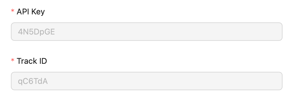
- Click X to close the dialog.
Tip: When utilizing our Integration Wizard, you won’t need to manage elements such as the API Key, Track ID, or Business ID.
Delete an App
To request the deletion of one of your apps, please contact our support team.